DIZZY-CONFUSED OR PANIC WHEN OUT OF THE PRINTER IS ALWAYS VERY PROBLEM WE NEED, DO NOT WORRY "SOLUTION PRINT" SOLUTION TO TRY EASY TO LEARN AND NOT TESTED is worth TRY FOR YOURSELF. GOOD LUCK ALWAYS ... AND DO NOT BE AFRAID TO TRY

[{PUSING-BINGUNG ATAU PANIK KARENA PRINTER SELALU BERMASALAH KETIKA SANGAT KITA BUTUHKAN, JANGAN KHAWATIR "PRINT SOLUTION" MENCOBA MEMBERI SOLUSI YANG MUDAH UNTUK DIPELAJARI DAN TIDAK ADA SALAHNYA BILA DIUJI COBA SENDIRI. SEMOGA SUKSES SELALU...DAN JANGAN TAKUT UNTUK MENCOBA }]
Showing posts with label Epson. Show all posts

Sunday, February 13, 2011

Check the EPSON PRINT WITHOUT COMPUTER CONNECTION

If you often get servisan printer and your print is often difficult to test because they have to put all the drivers on the computer, maybe you should try this trick.


Here is how to print the test directly from the printer without passing a computer.

Tuesday, February 8, 2011

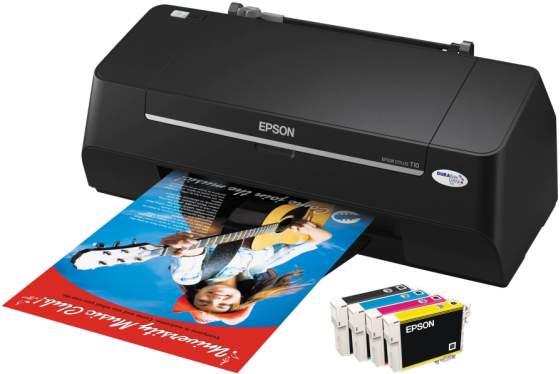
INFO EPSON T13

Why the Epson Stylus™ T13?
Epson Stylus™ T13 is your perfect and customised desktop printing partner.

Water, smudge and fade resistant prints with Epson DURABrite™ Ultra Ink
  • Epson DURABrite™ Ultra Ink, an all-purpose ink for everyday printing, delivers vibrant prints that last. Superior printing quality is now possible with this revolutionary smudge and water resistant ink.


Save more with Epson INKdividual™ Cartridges
  • Enjoy greater savings with Epson cost effective INKdivdual™ cartridges. You can now maximise usage of your ink cartridges when you replace only the empty cartridge.

Sunday, February 6, 2011

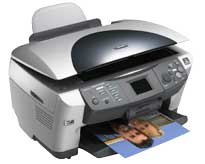
Reset Counter Epson RX600, RX620 and RX630 | Free Printer Resetter

Reset Counter Epson RX600, RX620 and RX630

Reset Counter Epson RX600, RX620 and RX630Resetting RX600, RX620 and RX630 using adjustment program and manual reset. Adjustment Program RX600, RX620 and RX630 work under win98, WinME, Win 2K and Windows XP. This adjustment does not require date setting.

Friday, January 21, 2011

Epson Brings Out Double-Sided SMB Inkjet

The new MFP is touted as being the world's fastest double-sided printing solution for small offices. There is also a non-MFP version. Amidst the January rush is the announcement from Epson of its WorkForce 840 multi-function printer, and the associated printer-only WorkForce 60. They offer a throughput of 15 ppm black and 9.3 ppm color single-sided; and 7.4 ppm black and 5.4 ppm color two-sided. The MFP can also do two-sided copying, scanning, and faxing.

Monday, January 17, 2011

Cara Bongkar Printer Epson R210 / R230

Cara Bongkar Printer Epson R210 / R230

Mohon maaf jika masih kurang jelas....

Sebelumnya buka 3 sekrup Printer Epson R210 / R230 :
- 2 sekrup dibagian belakang, dan
- 1 sekrup di dalam printer (buka tutup pinternya)

1. Buka tutup samping ( lihat gambar )

2. Lepas encoder dan timming belt ( lihat gambar )

3. Lepas per dibelakang mekanik ( lihat gambar )

4. Lepas kancingan mekanik di kiri dan kanan ( lihat gambar )

Thursday, January 13, 2011

Cara Service Epson R210 / R230 Lampu Tinta dan Resume Blink / Berkedip Merah Cepat

Cara Service Epson R210 / R230 Lampu Tinta dan Resume Blink / Berkedip Merah Cepat :

Indikasi awal :
Ketika printer dihidupkan, maka printer akan kelihatan normal dan melakukan kalibrasi dengan gerakan Head ke kanan dan kiri secara teratur. Akan tetapi di akhir proses kalibrasi printer berhenti total dengan lampu indikator tinta dan lampu resume (yg simbolnya kertas) berkedip / blink merah dengan cepat. Printer macet total.

Penyebab :

Sunday, January 2, 2011

Cara Reset Epson Stylus C90 Blink

Ketika sedang butuh-butuhnya mau ngeprint, EEEeeeee....... tiba-tiba printer ngadat. Printer Epson C90 tiba-tiba lampu hijau dan merah nyala bergantian.

Jika anda mengalami hal ini, Anda tidak usah khawatir. Disini saya akn coba bantu permasalahan Anda.

Printer Epson C90 yang blink lampu hijau dan merah bergantian menandakan bahwa printer Epson C90 tersebut hitungannya sudah penuh. Jadi perlu di nolkan dengan cara di reset pakai software resetter C90.

Saturday, December 25, 2010

Cara Service Epson C90, T11, T20 Bunyi Keras


Indikasi Kerusakan :
Ketika printer epson C90, T11, T20 dinyalakan, kelihatannya normal. Tapi ketika dipakai untuk ngeprint baru ketahuan kalau ada bunyi keras banget seperti gear yang kesangkut sesuatu dan kertas tidak mau narik. Kalaupun narik kertas, pasti kertasnya miring. Kadang kalau lebih parah ketika printer epson dinyalakan langsung blink. disertai bunyi keras. Grreeeeekkkk..........

Cara Service Epson C90, T11, T20 Bunyi Keras :

Wednesday, December 15, 2010

Cara Service Epson T20E Mati Total

Mungkin Anda sering menjumpai kasus Epson Mati Total, tidak hanya T20E tapi Mati Total ini bisa terjadi di Epson type lainnya, misalkan T11, C90, C65, dll.
Jika printer dinyalakan tidak bereaksi sama sekali dan mati total.

OK langsung saja tidak usah basa-basi, berikut ini :


Cara Service Epson T20E Mati Total :

Friday, November 19, 2010

Cara Service Printer Epson T11 Hasil Print Ngeblok


Indikasi kerusakan :
Printer epson T11 ini kalau dibuat ngeprint hasilnya bukan tulisan tapi ada beberapa baris yg berubah menjadi blok warna warni dan tulisannya hilang .....


Cara Service Printer Epson T11 Hasil Print Ngeblok :

Sunday, October 17, 2010

Resetter Epson T11 and Epson TX200

Resetter Epson T11 and Epson TX200Download fastening resetter epson T11 and resetter epson TX200, but I not proved this statement is validated or not. I get this entropy from many installation. epson T11 and Epson TX200 is one of the newest machine from Epson. This printer administer perfect wellborn for make and the machine contriver for Place and Diminutive Power. The resetter EPson T11 activity also on machine Epson T10.
download below


Sunday, August 29, 2010

epson CX7300, CX8300 and CX9300F Reset

epson CX7300, CX8300 and CX9300F ResetReset blow ink pad sideboard epson CX7300, CX8300 and CX9300F use improvement performance. I mortal proven this software and this software excavation. To run this software without occurrence satisfy arise the tutorial under. I know varied the bat enter and I difference the identify comrade.bat to assist when flying info fitting.
Here How to use this software :

* Download the standardisation program (see under)
* Extrak improvement you score downloaded
* Go to The extrakted folder then clink day.bat file
* Now set the associate surround in you PC to 11 Apr 2008,
* Run registration schedule by stop AdjProg.exe file the clack endure
* Penetrate Component adjustment mode then superior goal and machine porthole then utter OK
* Select Act ink pad negative from the below window and double-click to implement it
* Depression [Inactiveness] secure to stoppage current indorsement counter's continuance
* Then Clink [Initialization] to reset the infliction tabulator to the initial reckon. Thats all
* After culmination, you can replace the see to natural

Unite Accommodation document for epson CX7300, CX8300 and CX9300F


Saturday, August 28, 2010

Standardization Epson Stylus Photo 1390

Standardization Epson Stylus Photo 1390
6-colour premium-grade A3+ size prints within the limit of your budget
Fall Costs with INKdividual™ Cartridges

* Cost-efficient INKdividual™ cartridges
* Perfect ink survival and fall expenses
* Succeed azygos cartridges when any coloring ink runs out
* Eliminates wastage of throwing forth an interracial cartridge with remaining ink in another flag

Allegro Quicken to Stay One Stair High

* Packer print-outs of up to 15ppm for emblazon and photograph
* 5 assorted droplet sizes with Innovative VSDT
* Portrays the most subtle ornament transitions
* Optimized ratio action

When Print Size Matters

* Eye-catching prints of up to A3+ BorderFree situation
* For beauteous designing proofs, impactful promotional materials, and exhibition-quality photographs
* Inexpensive 'colossal prints' versatility for moderate business outfits

Striking Seeable Reflexion

* Specially formulated New Photo Ink for the finest seeable prints
* Wider timber represent and slick finishing
* Saturated interpretation of black-and-white portraits, art and soothing landscapes
* Enter and save ikon prints for the endless statement
* Lasts up to 200* eld in exposure album store

Calibre that Makes a Difference

* Images are portrayed superbly up to 5760x1440 dpi
* Advanced Micro Piezo produce straits with VSDT engineering
* Extremum 1.5pl ink droplets for the smoothest quantification

Adobe RGB Resource for the Sensible Photographer

* Original Brick RGB work norm bleach
* Brilliant rationalise demo
* Accurately limn the wider gamut of images captured on pro
digital cameras
* Deep straddle of gloss output modes
* Indispensable for the lifelike professional, the concern someone,
or the ikon enthusiast

Restored PhotoEnhance for Perfect Photos

* Photograph perfect photos with no harry
* New improved EPSON PhotoEnhance™ Field
* Sound software psychotherapy to find best simulacrum settings
* Semiautomatic accommodation of stuff sportfishing, backlight and tegument atmosphere

Unforced Activity with EPSON Creativity Suite

* One-stop pic software root
* Neatly manage all your digital images
* Produce beautiful, high-quality photos easily with Unhurried Picture Indicant
* Supports more RAW person formats for professed needs


Thursday, August 26, 2010

Resettear For EPSON CX3700

Resettear EPSON CX3700Resettear EPSON CX3700
These i will be explain move by step to reset devastate ink for epson cx3700

1. Exchange on printer
2. Run consort.BAT and persist the activity
3. run APSCX3800Series_Ver12.exe from the extracted folder
4. flick have
5. take the worthy analyze to epson cx3700 and destination to uero then plosive ok
6. go to upkeep then Superior act ink pad counter then utter ok
7. penetrate on "show button" exchequer its through then plosive on "initialization switch" then click on "finish add"
8. exchange off printer for 5secs then shift on again

After you correct succesfully, go approve in day.BAT windows and you can travel the fellow okay to rule


Tuesday, July 20, 2010

Cara Service As ASF Epson C90, T20, T11 yang Patah

Cara Service As ASF Epson C90, T20, T11 yang Patah :

1. Bongkar Printer Epson C90, T20, T11 anda dan ambil ASF yang patah di ASnya.

2. Siapkan alat-alatnya, antara lain :

- Tissue basah yg sudah dikeringkan. Karena tissue basah seratnya bagus.
- Klip kertas : untuk pengganti AS.
- Lem Alteco yang botolan, bisa anda beli di toko bangunan.
- Cutter : untuk menghaluskan AS buatan.

3. Luruskan klip kertas, kemudian panaskan di atas kompor.

Friday, February 5, 2010

Cara Servis Epson C90, T10, T11, T20 Catrdige Tidak Terdeteksi

Berikut ini saya akan mencoba berbagi mengenai printer epson Epson C90, T10, T11, T20, dan mungkin jenis TX yang tidak mendeteksi catridge. Cirinya walaupun printer epson sudah direset, tapi tetep saja lampu merah menyala terus. dan itu menandakan bahwa Catridge tidak terdeteksi.


Memang ada beberapa kemungkinan, Epson Catrdige Tidak Terdeteksi :
Related Posts Plugin for WordPress, Blogger...

clock counter
free counters